APIs
APIs — Application Programming Interfaces
An API, in its simplest sense, is a technology that connects two systems.
The library analogy:- The library → the database
- The books → the data
- You → the requestor (application looking for information)
- The librarian → the API (takes the request to the database and returns information)
- Your book request → the call made to the API
- The catalog → the specific format the request must follow
- The book received → the response
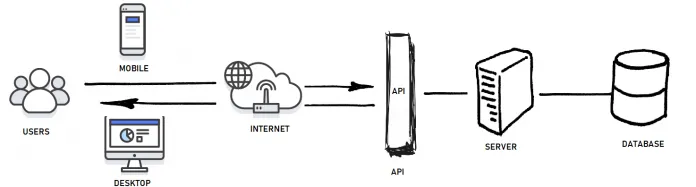 Real-life example: On LinkedIn, you search for fintech companies. LinkedIn executes the search and displays results from thousands of companies in under a second. This is facilitated by LinkedIn's Company Search API.
Why should PMs care about APIs?
Real-life example: On LinkedIn, you search for fintech companies. LinkedIn executes the search and displays results from thousands of companies in under a second. This is facilitated by LinkedIn's Company Search API.
Why should PMs care about APIs?
APIs open up opportunities to build a more integrated product. As a PM, it helps to understand the benefits and constraints of technical solutions so you can make and communicate product decisions effectively. You don't need to dig into code — you need to understand the value it provides and be able to communicate why it's necessary to stakeholders.
API types:- Public APIs — open for use external to a company. Examples: Google Maps API, Braintree payments API, LinkedIn Company Search API.
- Private APIs — developed for internal use with specific access. Examples: internal customer information APIs used by different business functions.
- REST (Representational State Transfer) — the most common type today. Uses HTTP functions (GET, POST, PUT, DELETE). Flexible in terms of data types and has low bandwidth. Information typically sent/received via JSON files.
- SOAP (Simple Object Access Protocol) — an actual protocol. Uses HTTP and XML. Heavier in terms of bandwidth and payload.
Databases
Databases — A Deeper Dive
A database is essentially a structured way of storing and managing data. It's like a highly organised digital filing system that allows you to store different types of information — user profiles, product details, orders, etc. — in a way that makes it easy to access, update, and search.
Types of databases:- Relational databases — organise data into tables with rows and columns, like a spreadsheet. Use SQL (Structured Query Language) to interact with and manipulate data. Examples: MySQL, PostgreSQL, Oracle.
- NoSQL (non-relational) databases — designed to handle large amounts of unstructured or semi-structured data more efficiently. Often used in applications that need to scale rapidly, such as social media platforms or real-time analytics. Examples: MongoDB, Cassandra, Redis.
- Understanding product data.
- Uncovering insights not easily available in product analytics tools.
- Making decisions and executing faster by eliminating dependency on data teams.
While PMs don't need to be SQL experts, basic proficiency in SQL can greatly enhance your ability to make data-driven decisions and communicate effectively with technical teams.
How Web Applications Are Built
How Are Web Applications Built?
Web applications are built using a combination of programming languages and technologies. The core components:
Front-end (what the user sees):- HTML — provides the structure and content of web pages.
- CSS — handles the styling and layout.
- JavaScript — adds interactivity and dynamic behaviour.
- Python (with Django or Flask)
- JavaScript (with Node.js and Express.js)
- PHP, Ruby, Java, C#
- Relational — MySQL, PostgreSQL, Oracle
- NoSQL — MongoDB, Cassandra, Redis
- Set up the development environment.
- Build the front-end UI using HTML, CSS, and JavaScript.
- Develop the back-end logic using a server-side language.
- Integrate front-end and back-end.
- Implement data storage and retrieval with a database.
- Incorporate third-party APIs if needed.
- Test thoroughly, then deploy to a web server or hosting platform.
Technical Debt
Technical Debt
Technical debt is incurred when developers make the trade-off to do something quick and dirty vs. slower and cleaner. Like financial debt, this involves "interest payments" in the future — development becomes more clunky and at some point teams need to "pay down the principal" by refactoring code.
The house analogy:Imagine building a house quickly by taking shortcuts — laying no proper foundation. The house may look fine, but over time you'll need to invest more effort to fix issues, make repairs, or even rebuild parts. Software technical debt works the same way.
Is tech debt always bad?No. Tech debt taken on to quickly test and validate ideas is acceptable — it's the bedrock of lean product development. Testing small iterations and validating need before investing in a scalable solution is smart. There's no point building a perfect technical solution if customers reject the product.
However: tech debt is only acceptable if there's a commitment to pay it down before the product or feature is scaled. How should PMs approach tech debt?- Case by case decisions — negotiation between product and engineering on how much effort goes to new features vs. paying down debt. Requires a strong, trusting relationship between leaders.
- A fixed "budget" — a more prudent approach. Agree to a fixed allocation of capacity for tech debt each sprint, or dedicate one in every four sprints to technical effort.
Webhooks
Webhooks
Common webhook use cases:- Sending notifications — webhooks can send notifications when a specific event happens. For example, notifying a user when a package's delivery status changes from 'processing' to 'out for delivery'.
- Third-party integrations — a CRM might use a webhook to update a specific customer's personal account information.
- Workflow automation — webhooks power no-code automation workflows. A productivity tool might use webhooks to automatically assign tasks to team members.
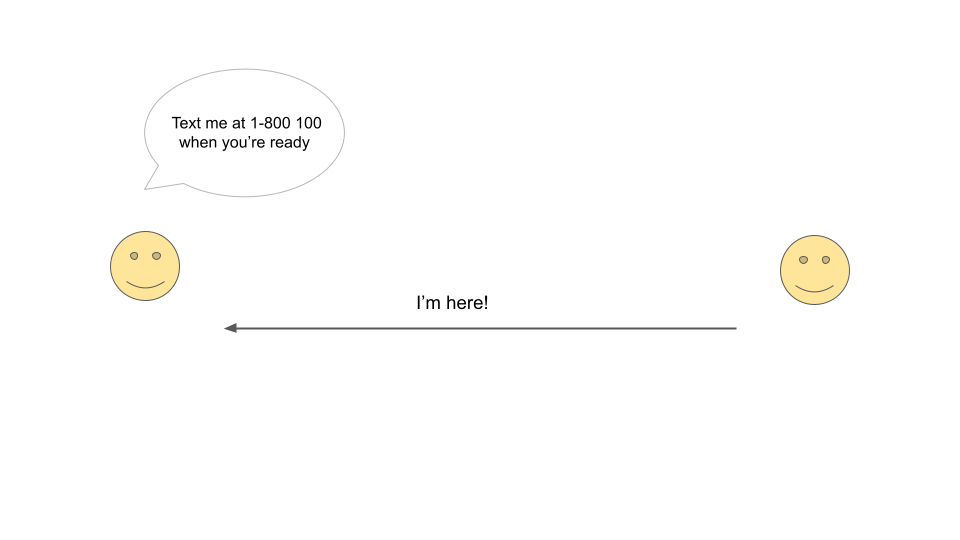
You want to know when your friend arrives at a cafe. You tell them "text me when you arrive." When they arrive, that's the trigger — they send you a text to the number you gave them.
This is how webhooks work. Your engineers write code that 'subscribes' to a specific event and specifies where to receive it. This process is called 'listening' for an event.
 Real-world example — payment failure notifications:
- You tell Stripe: "whenever a payment method fails, let me know."
- You provide a URL for Stripe to send the failure notification.
- When a customer's payment fails, the business owner receives a webhook notification automatically.
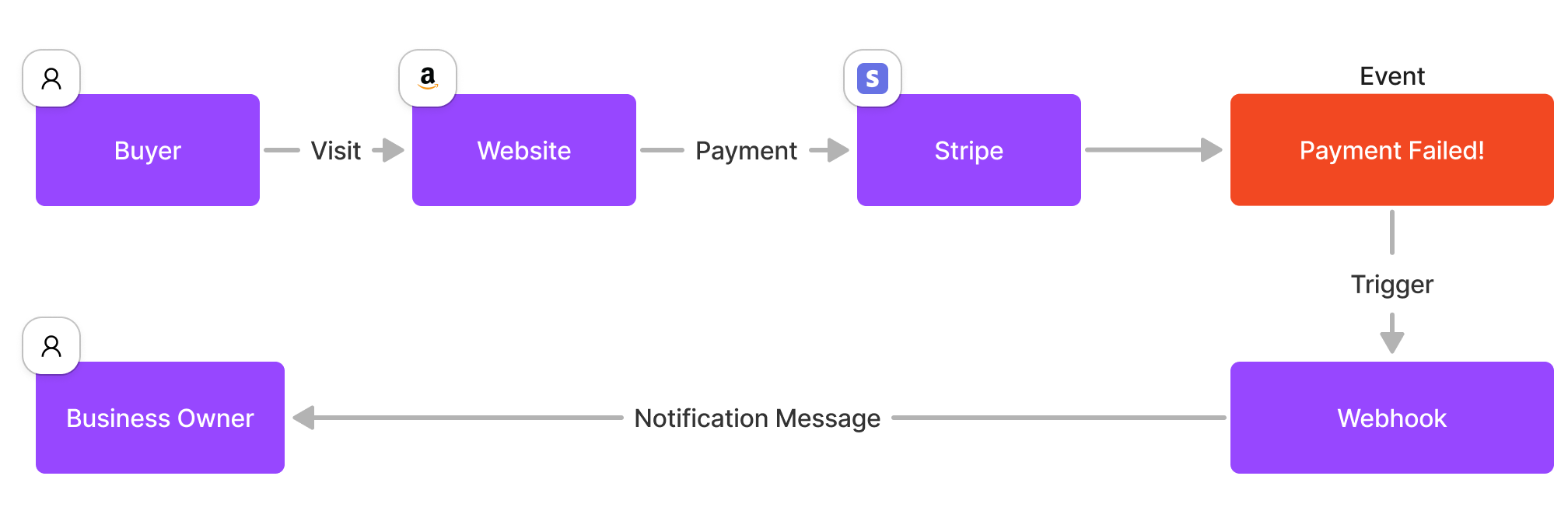 APIs and Webhooks together:
While APIs and Webhooks serve different purposes, they can be used together. An application might use an API to retrieve data and configure webhooks, and then use webhooks to receive real-time updates from the same service.
System Design for PMs
System Design and Architecture for PMs
As a product manager, you don't need extensive knowledge of designing system architecture — engineers and architects are better equipped. But you need to understand the ramifications of software design choices on the product and its future growth.
An engineer usually only has the context of the requirement provided to them. They solve the problem within those constraints and might not have insight into the long-term goal. Design is an iterative process — you can't have a perfectly designed system from the start. Any choice taken in design has implications.
Why this matters for PMs:- Understanding design trade-offs helps you make informed product decisions.
- Awareness of system constraints helps you set realistic expectations with stakeholders.
- Knowledge of architecture helps you contribute meaningfully to technical discussions.
A programming language is a set of instructions and rules that allows humans to communicate with computers. Just like we use English to communicate with each other, programming languages communicate with computers.
Popular languages and their uses:
- Python — data analysis, machine learning, backend web development.
- JavaScript — frontend and backend web development (Node.js).
- Java — enterprise applications, Android apps.
- C# — Microsoft ecosystem, game development (Unity).
- Ruby — web development (Rails framework).
Writing SQL Queries
Writing SQL Queries
SQL (Structured Query Language) is the standard language for interacting with relational databases. As a PM, SQL allows you to answer product questions directly from data without depending on a data team.
Core SQL concepts:- SELECT — retrieve data from one or more tables.
- WHERE — filter rows based on conditions.
- GROUP BY — aggregate data into groups.
- JOIN — combine data from multiple tables based on a related column.
- ORDER BY — sort results.
- COUNT, SUM, AVG, MAX, MIN — aggregate functions for calculating metrics.
- How many users signed up last week vs. the week before?
- What is the average order value by city?
- Which features are used by users who retained after 30 days?
- What is the signup funnel drop-off at each step?
- Mode SQL Tutorial — beginners to advanced with an in-browser editor.
- SQLZoo — interactive exercises covering SELECT, JOIN, aggregation, subqueries.
- W3Schools SQL — quick reference for syntax and functions.